As an avid podcast and audiobook listener, this security research started with a simple problem: I wanted a way to download, organize, and listen to my media without having my entire library beholden to an online platform I had little control over. That search eventually led me to Audiobookshelf, an open-source, self-hosted audiobook and podcast server built primarily with Node.js.
It is lightweight, actively maintained, and seemed to fit pretty much everything I was looking for. But, like any security researcher, I wasn’t going to blindly deploy an internet-facing application without first poking around the source code.
For a relatively young project, first released in 2021, Audiobookshelf has developed a fairly mature security posture. Over time it has gone through a number of security hardenings, including stronger authentication mechanisms such as JWT-based authentication and OIDC support. Its Vue.js front end also benefits from the framework’s default HTML escaping, which helps reduce some of the usual cross-site scripting attack surface.
Of course, no piece of software is 100% secure (Unless you are Microsoft).
So I started digging through the application to see if anything interesting stood out. One of the first things I checked was what third-party libraries the server shipped with.
That was when I noticed FFmpeg or more accurately fluentFFmpeg which is just a simple FFmpeg wrapper for Node.
Its inclusion wasn’t particularly surprising. Audiobookshelf is a media server, after all, and FFmpeg is one of the most widely used tools for working with audio and video. However, some of you may have already seen why this caught my interest.
This is because FFmpeg has a long and interesting security history. It supports a massive number of formats, codecs, demuxers, and protocols, and that flexibility has led to some interesting vulnerabilities, especially when it’s used by server applications to process untrusted media. For example, CVE-2025-31499 which unsafely processed user-input and passed it to FFmpeg.
With that in mind, I started tracing Audiobookshelf’s FFmpeg calls.
Eventually, that led me to CacheManager.
Following the Cache
Audiobookshelf allows clients to request resized versions of images such as book covers and author artwork. This is useful for obvious reasons: a mobile client doesn’t necessarily need the same full-resolution cover image that might be stored in the library.
To avoid doing the same work over and over, Audiobookshelf caches these resized images. The first time a particular size is requested, the application generates it using FFmpeg and stores the result. Future requests for that same size can then be served from the cache.
Which, on its own, is pretty standard. But the cache can only work with what it’s given, and the values used to generate those cached images ultimately originate in the request.
Image endpoints accept width and height parameters from the HTTP API request. In the author image controller, for example, those values were parsed into integers and placed into an options object:
const options = {
  format: format || (reqSupportsWebp(req) ? 'webp' : 'jpeg'),
  height: height ? parseInt(height) : null,
  width: width ? parseInt(width) : null
}

return CacheManager.handleAuthorCache(res, authorId, options)
At first glance, this doesn’t look particularly dangerous. The input is converted to an integer, so any command injections or escapes are out of the question.
However, we still have control of passing any valid integers to CacheManager as there is no bounds checking on both the height and width variables.
The options object eventually reached CacheManager, which checked whether a cached image with the requested dimensions already existed. If it didn’t, Audiobookshelf generated one using FFmpeg and the height and width arguments.
The resizeImage helper inside ffmpegHelpers constructed an FFmpeg scale filter using those dimensions:
async function resizeImage(filePath, outputPath, width, height) {
  return new Promise((resolve) => {
    var ffmpeg = Ffmpeg(filePath)

    ffmpeg.addOption(['-vf', `scale=${width || -1}:${height || -1}`])
    ffmpeg.addOutput(outputPath)

    ffmpeg.on('error', () => {
      resolve(false)
    })

    ffmpeg.on('end', () => {
      resolve(outputPath)
    })

    ffmpeg.run()
  })
}
In other words, the API request parameters controlled the dimensions of an image FFmpeg would attempt to create.
So naturally, I asked it for a very large one.
Crash and Burn?
My first attempt was a 16000x16000 image. That didn’t take down Audiobookshelf itself; instead, FFmpeg consumed enough memory that Linux’s OOM killer terminated the process.
Audiobookshelf handled that failure relatively gracefully. fluent-ffmpeg reported the failed child process as an error, while the main Node.js process remained alive.
Nevertheless, upon requesting for slightly smaller images like 17000x10000, I visually saw a delay before my new image was returned to me. This is because my request caused a massive spike in CPU usage as FFmpeg began to generate my image as seen by these Docker CPU graphs.
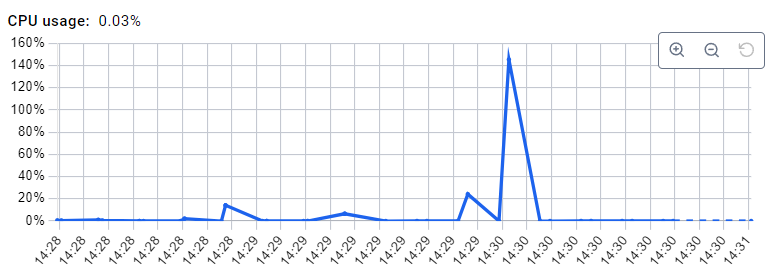 At 2:30PM I made 5 large image dimensions requests for FFmpeg.
That alone makes this a fairly typical resource-exhaustion denial-of-service attack. An attacker can send multiple requests for oversized images, causing Audiobookshelf to spawn expensive FFmpeg processes that compete for the CPU.
What makes this issue more interesting to me, however, is that the resource exhaustion doesn’t necessarily end when FFmpeg finishes. It can also be turned into a disk exhaustion attack.
Remember that these resized images are being generated for the cache. When FFmpeg successfully completes a resize, the resulting image is written to disk so that Audiobookshelf can serve it directly the next time those dimensions are requested. Normally, this saves resources. In this case, it also means that every successful oversized resize can leave something behind.
An attacker can take advantage of this by continually varying the requested dimensions. A request for 17000x10000 generates one cached image, while 17000x10001, 17000x10002, and so on can each result in another. Each unique request forces FFmpeg to perform another expensive resize while adding another file to the cache.
The result is a two-stage resource exhaustion attack. While the requests are being processed, the attacker consumes CPU through FFmpeg. After the processing is finished, the generated images continue consuming disk space until the cache is purged.
Conclusion
This vulnerability isn’t as serious or fun as RCE or some other FFmpeg-chained exploit you might find in the wild, but I found it interesting because it demonstrates an all-too-common assumption when using third-party tools: that the tool will somehow protect the application from unreasonable input.
There wasn’t actually anything wrong with FFmpeg here. There wasn’t anything inherently wrong with Audiobookshelf’s caching feature either. In fact, both were doing exactly what they were supposed to do. FFmpeg was asked to generate a very large image, so it tried to generate a very large image. The cache was given a newly generated image, so it stored it for later.
The problem is that the server treated syntactically valid input as safe input. While validation ensured the input was in the expected format, it did nothing to ensure that the resulting values were reasonable or safe to pass to a third-party component. When applications expose the functionality of powerful libraries and tools to untrusted input, valid input can still be abusive input.
This abusive input technique to me is an under-researched area as it is scenario dependent and tends to get fit under misconfiguration of XYZ rather than something to be aware of when incorporting XYZ into a product.
Links
- GitHub Advisory
- CVE: Requested (Pending).